Describe your video in plain language and vidBoard builds a structured, scene-by-scene draft for you in minutes. Add your avatar, refine the script, swap visuals, and publish when it looks right.
Text to Video creates a strong starting point. Like any first draft, a quick review and a few edits go a long way before you hit publish.
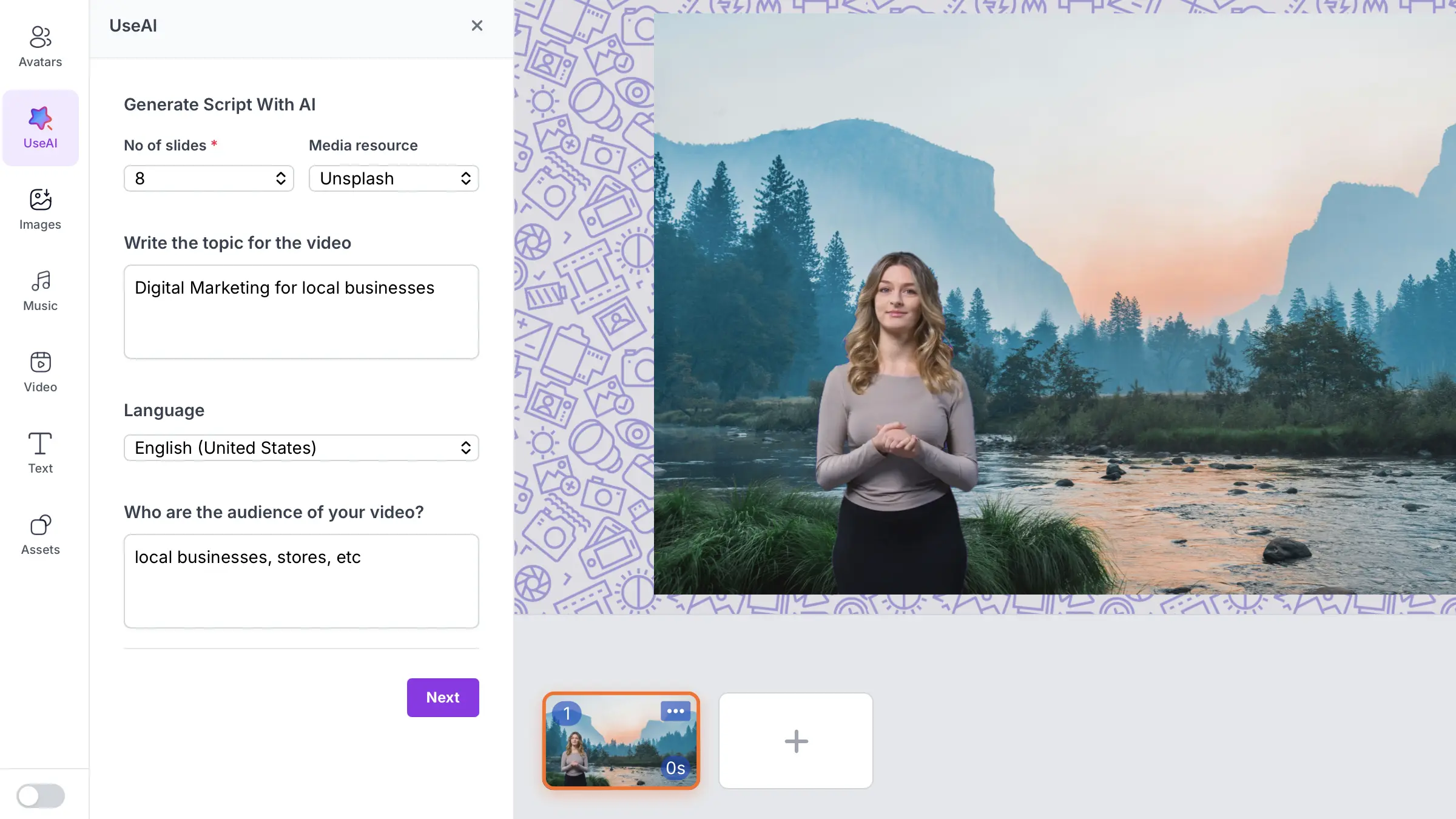
Fill in a few quick details and vidBoard assembles a complete video draft with scenes, script, and stock visuals ready for your review.

Pick between 1 and 8 scenes. Short and punchy or detailed and thorough, your call.

vidBoard auto-pulls relevant visuals for each scene from your chosen stock library.

Type what the video should be about. A sentence is plenty. Be specific for sharper results.

Generate your script and captions in the language your audience actually speaks.

Tell vidBoard who is watching. The AI shapes tone and messaging to match your viewers.
Text to Video sets up the structure, visuals, and narration. You bring the final polish.

vidBoard writes a structured narration script tailored to your audience and topic. Each slide gets its own focused message. Edit any line directly in the timeline before adding your voice or avatar.

Each slide is paired with a relevant image or video from your chosen stock library. You can swap out any visual in seconds if the auto-pick does not feel right for your brand.
Once your draft is ready, open it in the vidBoard timeline. Reorder slides, rewrite lines, swap visuals, add your AI avatar, and layer in a voiceover before you publish. The draft does the heavy lifting upfront.

Quickly draft explainer videos, product overviews, and promo content without starting from a blank timeline.

Turn lesson topics into structured video drafts. Focus on accuracy and tone instead of building scenes from scratch.
Beat creator's block. Type an idea, get a draft, spend your energy making it uniquely yours rather than building structure.

Produce company updates, sales pitches, or FAQ videos without a video production background or a big budget.

Honest answers about what Text to Video does and what to expect.
Not always. Text to Video creates a solid first draft with a script, scenes, and stock visuals. Most users spend a few minutes reviewing the script, swapping a visual, or adjusting a line before it feels ready. Think of it as skipping the blank-page stage entirely.
Your draft opens in the vidBoard video editor. You can rewrite any slide, swap stock visuals, add an AI avatar, layer a voiceover, and insert auto-generated captions all before exporting the final video.
Yes, completely. Every visual in the draft can be swapped in one click from within the timeline editor. You can also upload your own images or brand assets to replace any auto-picked stock photo.
More detail generally leads to a better draft. A vague topic like "marketing" will produce generic content, while "email marketing tips for SaaS founders" gives the AI enough context to write focused, relevant scenes. A sentence or two works well.
Yes. After the draft is generated, you can assign any of vidBoard's 100+ AI avatars or your own custom avatar to the video, then layer a voiceover from 1000+ AI voices or your personal voice clone.
Type your topic, pick your settings, and let vidBoard build the first version. All you need to do is make it yours.