Sound like you, without the mic.
Record a short sample once. vidBoard creates a digital copy of your voice that reads any script you type, in your tone, in other languages too.
"फिर से स्वागत है। आज हम तीन सबसे ज़रूरी बातों पर बात करेंगे।"
See exactly what you'll use
Real screens from Clone Your Voice inside vidBoard, from the first click to the finished file.
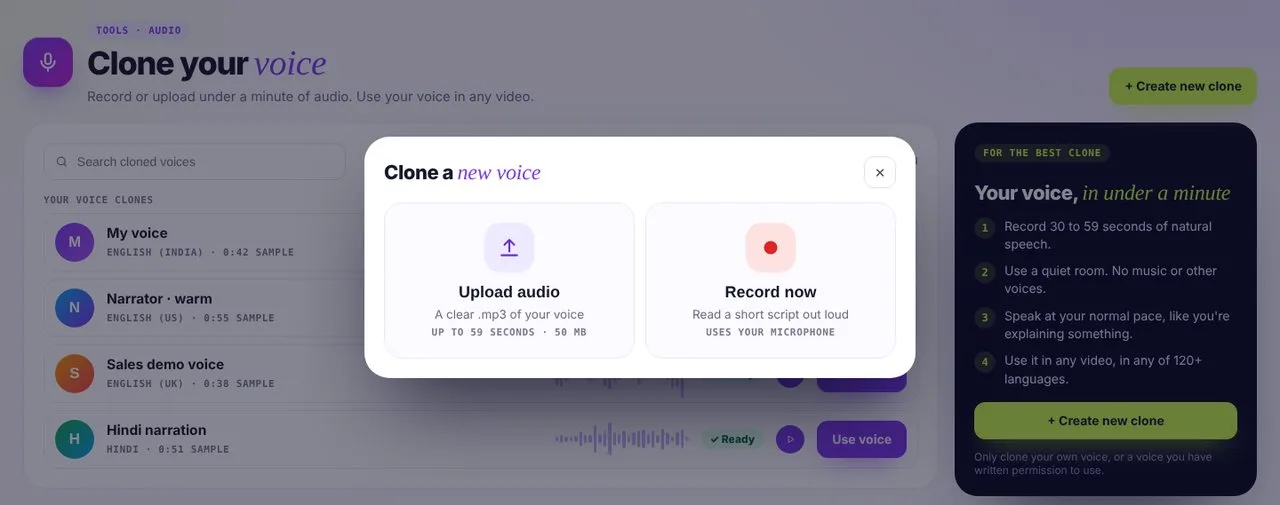 01Record or upload
Up to 59 seconds of clear speech is all it takes.
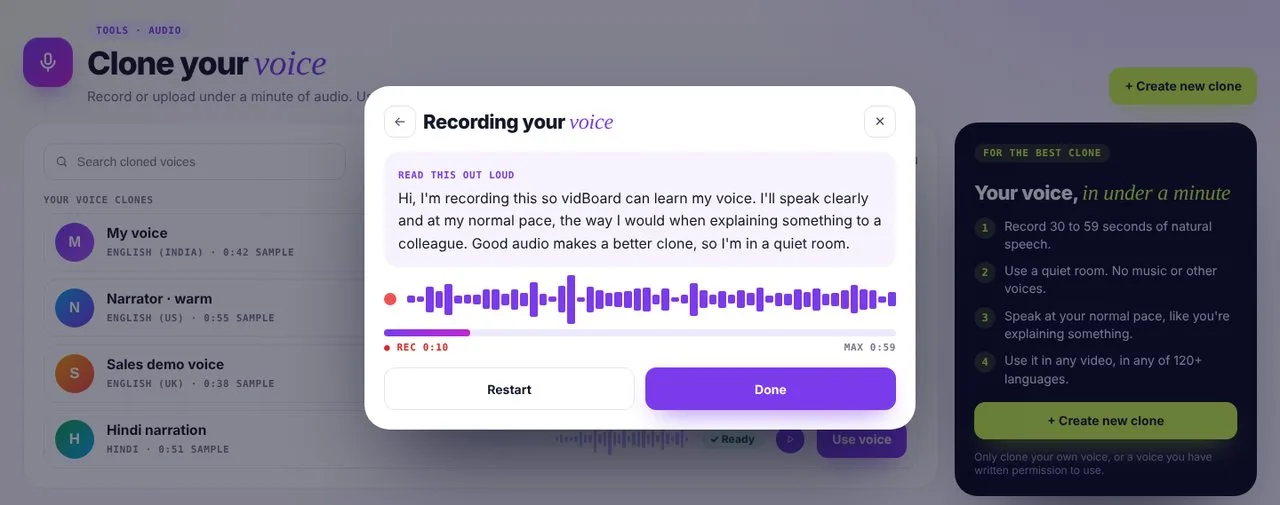 02Read the script
A short script on screen, so you know exactly what to say.
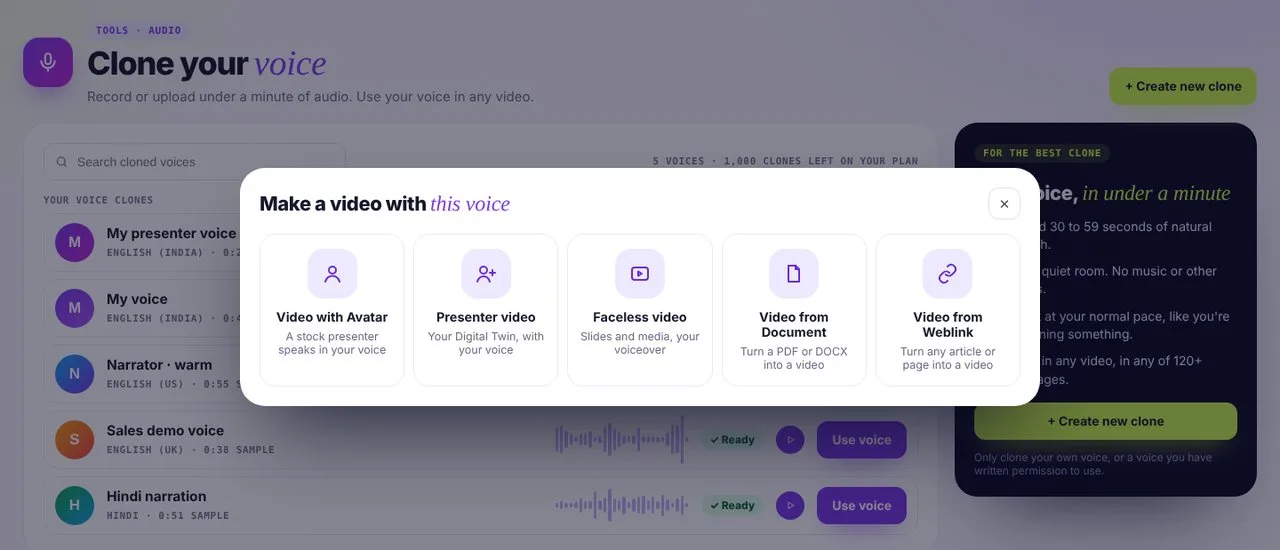 03Use it anywhere
Make an avatar, faceless, document or weblink video with your voice.
Three steps to your voice
- 1
Record a sample
Read a short script out loud in a quiet room, or upload a clear MP3. Up to 59 seconds is all it takes.
- 2
vidBoard learns your voice
Your tone, pace and accent are captured in a private voice model.
- 3
Type, and hear yourself
Pick your voice in any project and it reads whatever you write.
Your voice stays yours
You can only clone your own voice, or one you have permission to use, and your voice model is private to your account.
Voice questions
What do I need to record or upload?
A clear recording of one person speaking naturally, with no background music, overlapping speech or strong echo. Record 30 to 59 seconds in your browser, or upload an MP3 of up to 50 MB. A quiet room and a steady, natural pace give the best result.
How long does it take to create my cloned voice?
It depends on the material you upload and how busy processing is. vidBoard shows the status while your voice is being created. There is no guaranteed completion time.
Can I make more than one cloned voice? Does it use up videos from my pack?
Yes, within the limits of your pack. Creator includes one cloned voice and Pro Studio includes two. Creating or replacing a cloned voice doesn't use any videos from your pack. The videos you render count against your pack as usual.
Can I re-record or replace my cloned voice later?
You can create another cloned voice if your pack has a free slot. If you've reached your limit, email admin@vidboard.ai. The team reviews removing an existing clone case by case, so you can create a replacement.
Which languages can my cloned voice speak, and does it keep my accent?
vidBoard currently uses Fish Audio for voice cloning. Its S2.1 Pro model documents support for 83 languages, including English, Hindi, Japanese, Chinese, Korean, Spanish, Portuguese, Arabic, French, German, Russian, Italian, Turkish, Dutch, Polish, Indonesian, Vietnamese and Thai. The languages available depend on the active cloning model and vidBoard's setup, and may change as our technology partners evolve. Your cloned voice aims to keep your vocal identity, but accent, pronunciation and expressiveness can vary by language.
Who can access my cloned voice? Can my team use it?
Your cloned voice belongs to your vidBoard account.
Is my voice used to train AI models?
No. vidBoard doesn't use your uploaded voice, images, videos or other content to train AI models, and doesn't sell it to third parties. vidBoard may use contracted technology providers to process your requests, under its agreements with them.
How do I delete my cloned voice, and what happens to the recording?
Email admin@vidboard.ai to delete your cloned voice or your account. vidBoard removes the relevant assets, including with its contracted processing providers where needed. Generated audio and rendered videos follow the retention period in your plan or vidBoard's policies.
Where is my data stored?
vidBoard processes and stores customer content in the US West region. Generated audio and rendered videos are kept only for the period stated in your plan or vidBoard's policies.
Can I clone someone else's voice?
Only if you have all the rights, permissions and consents needed. You're responsible for every recording you upload, including any that captures another person, and you must not upload material you aren't authorised to use. Before cloning starts, you confirm the voice is yours or that you have permission to use it.
How do you stop someone from cloning my voice without permission?
Everyone who clones a voice must have permission to use it. As an extra safeguard, vidBoard may flag suspicious third-party or public-figure content. These checks can't catch every unauthorised upload, so if you suspect misuse of your voice, report it to admin@vidboard.ai.
Can I use my cloned voice in commercial videos?
Yes. You have full rights to the videos you create with vidBoard, within your plan and vidBoard's Terms. You remain responsible for having the rights to what you upload, and for permission to use any third-party likeness, recording, music or image.