


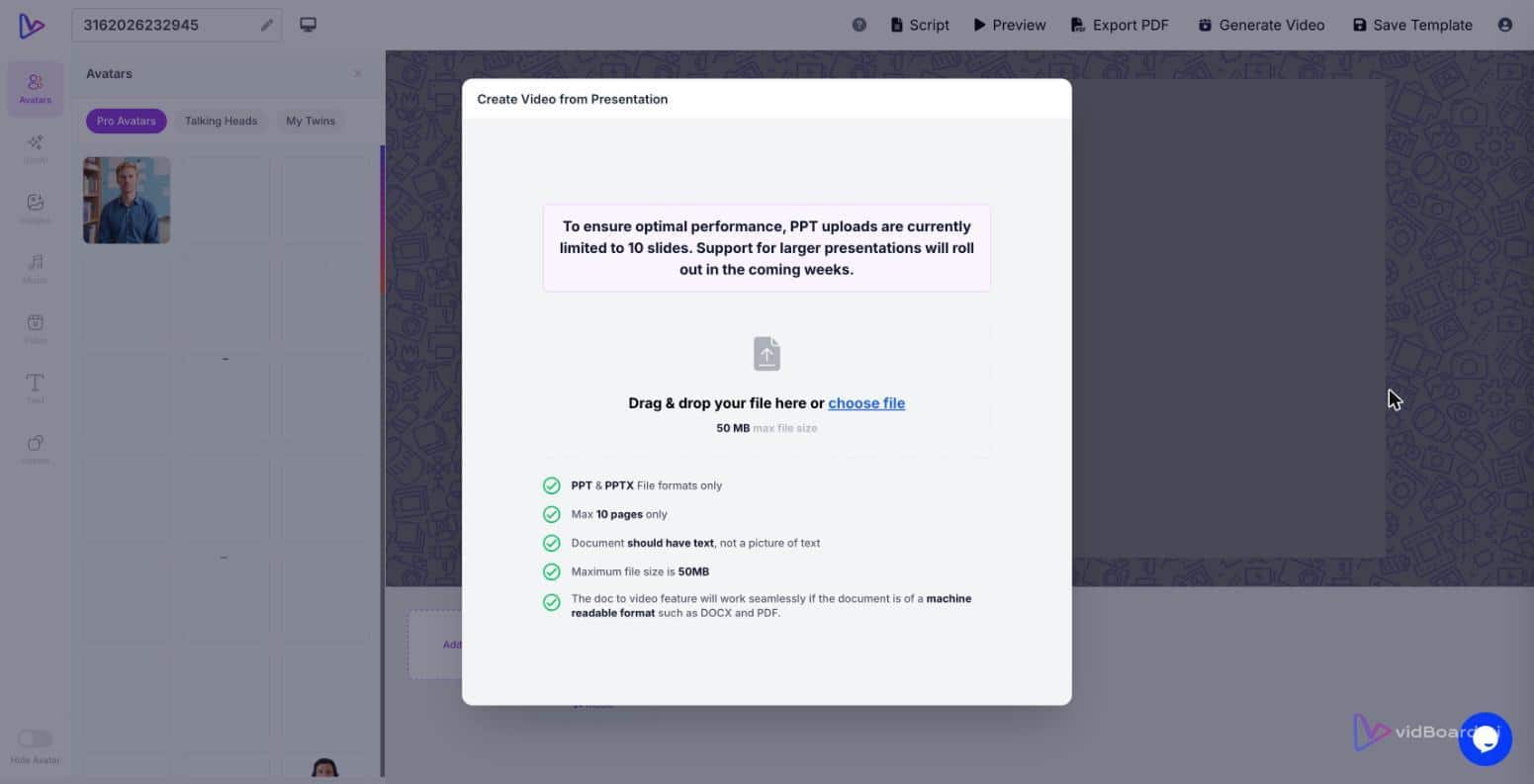
You have a 12‑slide Q3 product pitch that lives in a shared drive and a week of regional demos lined up — but the one person who knows the story best is on back‑to‑back calls. Uploading the .pptx to a file cabinet is the default; turning that deck into a narrated, on‑brand video that carries the presenter’s context is the alternative. vidBoard’s PowerPoint → Video workflow converts the deck itself into an editable, narrated sales asset you can share, localise and update without asking anyone to set up a shoot.
Why a narrated deck video fixes asynchronous selling
When sales teams circulate slides without a presenter, meaning is the first casualty. Bulleted points lose emphasis, timing cues vanish, and listeners are left guessing which slide to focus on or which objection the speaker would have addressed. The single difference a narrated deck makes is that it restores context: a voiced explanation, pacing and the small connective phrases that handle objections and next steps.
vidBoard keeps that presenter context by starting with the deck — not a blank canvas. Upload a .pptx and vidBoard parses each slide into editable objects (text, shapes, images), then generates a narrated draft: the platform writes and speaks the narration, matches visuals, and places timing on a slide‑level timeline so the delivery feels intentional rather than flat. Because everything stays editable, the narration is not a locked audio track: you can swap the voice, upload a human read, clone a salesperson’s voice for consistency, or add an AI avatar where a filmed presence helps close deals.
How a sales team builds a narrated sales asset, step by step
The workflow is designed for speed and control — the features that matter to enablement managers and busy sellers are all live.
- Upload the deck. PowerPoint → Video accepts .ppt/.pptx: slides are parsed into editable objects so the original copy and visuals stay intact and can be refined inside the editor.
- Generate the first draft. vidBoard structures the deck into scenes, writes and speaks the narration, and picks matching images or motion templates from the library. The result lands in a real, editable canvas rather than a final render.
- Choose voice and delivery. Use an AI voice, upload a human recording, or apply voice cloning to keep one salesperson’s tone across a catalogue of videos. Avatars and digital twins are optional; the platform supports faceless narrations just as well.
- Edit at scene level. Tweak copy, timing and motion per slide. Dislike one scene? Use per‑slide regenerate to rebuild just that slide and keep the rest untouched — no full rebuild required.
- Apply Brand Kit and templates. Brand Kit applies colours, fonts and logos automatically, and the template library provides consistent motion and layout across orientations (landscape, portrait and square) so one project yields assets for long form, Reels and short promos.
- Localise and caption. Create editable subtitles (roughly 99 languages), translate captions or dub the finished video into another language when you need regional versions or compliance copies.
- Export and distribute. Export an MP4, publish directly to YouTube, or produce PDFs of the slides for reference. The exported video carries the narration and timing that replicate a live presenter’s flow.
Note: PowerPoint → Video and the full content‑to‑video engine are included from the Creator plan upward, which is designed for teams that convert existing documents and decks into video at scale.
What this changes for enablement managers and field sellers
Replacing a static deck with a narrated, editable video shifts three practical levers in a sales program.
- Scale messages without reshoots. Treat a pitch deck as source material: generate a master video, then produce landscape, portrait and square variants from the same project. That means one approved story becomes a library of channel‑optimised assets without new recording sessions.
- Keep brand and voice consistent. Brand Kit, templates and voice cloning make it possible for every region and rep to present the same narrative and visual style, even when multiple contributors update content.
- Iterate fast at the scene level. Minor objections or product updates no longer require a whole new recording. Fix one slide, regenerate just that scene, and re‑export. The video stays editable so version control and rapid updates are operational rather than ad‑hoc.
Those three levers combine into the operational flywheel vidBoard is built around: a source deck becomes an editable master video, which then yields channel variants, captions and localised dubs — all without asking the seller to be present for every distribution.
This is asynchronous selling made materially better: recipients get the message delivered as the author intended, and sellers regain the time they would otherwise spend repeating the same demo.
For teams that use slide decks as the canonical record of product positioning or pricing, converting those decks into narrated videos turns a static library into a living enablement system — faster onboarding, clearer remote demos, and fewer lost deals because a slide lacked the missing sentence the original presenter would have supplied.