From product page URL to a branded promo video
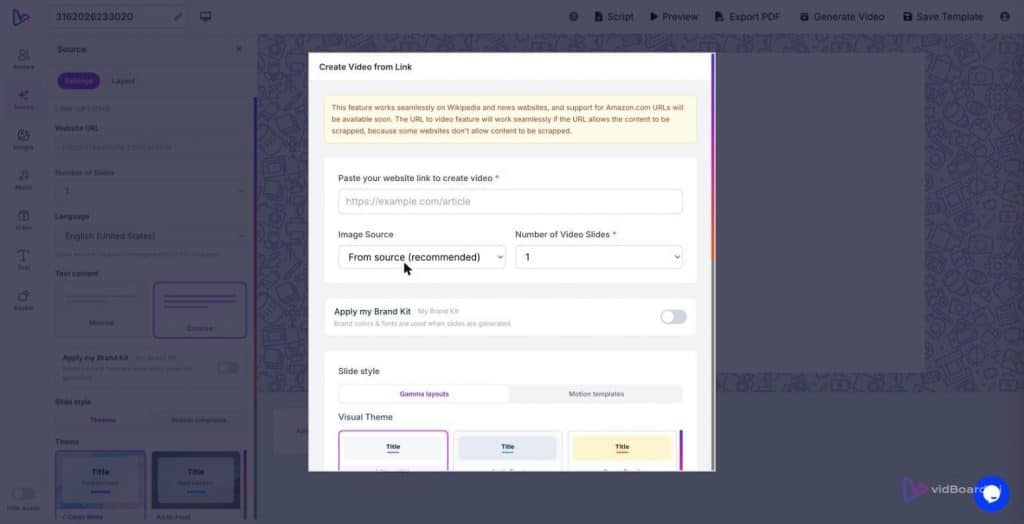
Paste your product page URL into vidBoard’s Link → Video input and watch the page’s headline, feature bullets, hero images and specification table become an editable video draft. vidBoard extracts the real text and visuals from the page, preserves names and numbers, and lays out a scene-by-scene narrative so you start with structure rather than a blank timeline.
How vidBoard extracts and organises product messaging
The conversion begins with content-first ingestion: Link → Video reads the page and breaks it into discrete scenes that mirror the page’s structure. Headline and subhead become opening slides; feature lists and benefits map to short explanatory scenes; customer proof points or stats are pulled into slide text rather than being re-written. That fidelity matters — vidBoard keeps the page’s actual facts, names and numbers instead of inventing details, so your legal, product and marketing teams can review a faithful first draft.
While it writes a draft narration for each scene, vidBoard treats that script as editable text, not a locked voiceover. Every sentence, timing cue and visual choice remains changeable on the canvas and on the timeline. If a feature needs reframing for marketing, change the line in the slide and the narration follows. If an image from the page is weak, swap it for a stock asset from the built-in media search (Pexels, Unsplash, Freepik, etc.) or your personal media library — both are available in the same workflow.
Turn that draft into a channel-ready asset across formats
Once content is mapped to scenes, design and brand rules take over. Choose from roughly 129 AI-fillable templates — motion templates and imported presentation layouts — and vidBoard will apply a layout and matched music to your product story. The Brand Kit stores logos, fonts and colours and applies them automatically to generated projects, which removes repetitive finishing steps and keeps every asset consistent at scale.
Design choices are not one-size-fits-all. vidBoard produces three orientations from the same project — landscape, portrait and square — with layouts adapted for each orientation rather than cropped. That single project becomes the source for a YouTube-length landscape video, a portrait clip for reels, and a square cut for social feeds. When the visual needs a thumbnail, use the platform’s YouTube Thumbnail Maker to create a 1280×720 cover that matches the creative direction.
Export formats are straightforward and channel-friendly: MP4 download, direct publish to YouTube, and export of project slides as a PDF for internal review or to hand to other teams.
Edit, localise and finalise without reshooting
The core advantage here is editable output. vidBoard treats the AI draft as a first pass: every element remains live on the canvas. Text, images, timing, motion and voice are all adjustable. If a single scene needs a different approach, use per-slide regenerate to remake that scene without rebuilding the whole project. That saves time on iterative review rounds and keeps the master project intact for future updates.
Voice and localisation are built into the finish line. Choose an AI voice from the platform’s multi-language library, clone an existing speaker’s voice for brand consistency, or upload a human-recorded narration when a live read is required. Subtitles use vidBoard’s in-house AI Subtitles workflow with word-level timing and support for roughly 99 languages; caption translation and AI dubbing are also available so you can publish the same product message in multiple regions without a re-shoot.
Use the timeline and per-object timing controls to finesse pacing: entrance and exit animations, continuous motion, and scene transitions are all editable so the final promo can be energetic or restrained depending on your campaign brief. If a statistic needs to read as a proof point, apply the platform’s infographic elements and big-stat widgets to present it clearly and consistently with the Brand Kit rules: sans-serif typography, no decorative filler, nothing on a slide that does not carry meaning.
Finally, because everything is saved as an editable project, updates are simple. Change a spec, tweak one sentence, swap an image, or regenerate one slide — then export the new MP4 or publish the revised file to YouTube. The process turns a static product page into a living campaign asset that can be trimmed, translated and redeployed across channels.
Converting an existing product page into a polished, branded promo is therefore not a separate design brief; it’s a workflow. vidBoard moves you from URL to reviewable video draft to multi-format campaign asset while keeping the original content, brand and approval controls at the centre. That path saves production steps, keeps factual accuracy intact, and produces a consistent set of deliverables for YouTube, social and internal teams from one editable source.